Widgets for Mac OS X
iStocks Widget: International Quotes
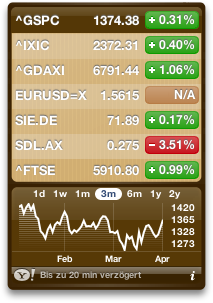
The iStocks Widget displays quotes and historical charts for international stocks, indices and currencies.
The widget is provided as freeware and is based on Apple’s Stock widget, which is shipped with Mac OS X. This original widget is limited to US symbols only. iStocks overcomes this limitation and uses the international Yahoo services.
 |
iStock.zip (225 KB) |
 |
iStocks-Manual.pdf (1,5 MB) |
| Version: | 0.3.9 |
| Release Date: | June 1st, 2016 |
| License: | Freeware |
| Requirements: | Mac OS X 10.4 up to 10.11 |
| Localization: | English, German, French, Italian |
Notable features include: option to sort by performance; support for multiple widget instances and 5 different color themes; renaming and reordering of symbols; robust chart fetching by using several fallback data sources; update notification; symbol lookup and suggestions; support for currencies; extended precision for quotes and changes.
See also the full manual as HTML.
Fixed in 0.3.9:
- Calling Yahoo Finance autocomplete API.
Disclaimer
The iStocks widget is provided AS IS, without warranty of any kind, expressed or implied, including without limitation the warranties of merchantability, fitness for a particular purpose and non-infringement. The entire risk as to the quality and performance of this widget is borne by you. Should the installation or operation of the iStocks widget prove defective, you assume the entire cost of any service and repair. The provider, Martin Backschat, is not responsible for any indirect, special, incidental, or consequential damages of any character including, but not limited to, damages for loss of goodwill, work stoppage, computer failure or malfunction, or any and all other commercial damages or losses.


 Martin Backschat\'s Blog
Torgeir said
Thank you so wery much! I have been looking for a widget pulling from the international Yahoo!Finance.
K said
This is great! It only allows seven stocks though – any plans to make it more flexible?
Max said
Martin, I translated your Widget in Italian and French languages.
Then I fix some little problem on the widget, and I added a new feature: Symbol Lookup.
Restored original color (I prefere)… and now I would like to publish on my blog the work.
But before I would like to contact you with e-mail. Now you have my email address, please contact me so I can show my fix, and if you’ll like it you could include it in next version (I called my version 0.1.3.2 continuing yours counter).
Max
P.s: Forgive my poor english.
Max said
Just change another thing… 0.1.3.3. Contact me as soon as u can! Bye
Roar said
Great widget, but it seems to have problems with currencies like EUR= and CHFNOK=X.
Dean said
Greetings,
I noticed your chart widget for stocks. I am trying to build a charting widget for displaying data charts for calculation of performance measurements. Where these chart mechanisms built only with the dashboard toolkit, or can these charts be deployed to multiple platforms? i.e. delivered through flash on multiple pda’s or platforms
Best,
Dean
Rens said
When you keep switching dashboard and finder, the Widget display (where you enter the symbol) gets messy.
Otherwise, great widget!
maba said
Dean, the chart mechanisms use the HTML element CANVAS for rendering. The chart information is obtained through Yahoo’s new Web API, which is currently not made public. But look for “http:” in the source code of the widget to locate my way of calling the API.
Rens et al, thanks for the issue reports; in the next couple of days I will post a minor update and try to adress them.
Mick said
I do note the Widget is supplied AS IS, but you may have a notion why some of the charts of several stocks and some indices have recently become garbage (check against Google finance or your other preferred source). Examples are EDIN.L, WWH.L, 3IN.L and GBPEUR=X . I suspect there are heaps more. This is sometimes reflected in the Yahoo online charts, though there it may sometimes affect not all the versions as with the widget, but typically the 6 month only, and/or other periods.
Normally this shows as the value hitting the floor around mid September before bouncing back up 10 days later; the widget charts however may also show the value effectively at zero from the 2 year max till mid September, when the value then becomes true, and the recent week’s chart shows correctly, I presume.
Because of the very large variance of the price this “event” trashes the y-axis for both widget and online alike (though for the widget all the charts are corrupted), making the resulting chart unintelligible. Just to be clear, these price fluctuations, much like a flash crash except over a relatively long period, did not occur. We and the rest of the planet would have known about it.
I do blame Yahoo for this, but accessing them isn’t easy. Some other apps use their data too, and the problem is the same. Until fixed the charts will continue to be useless.
It is ruining an otherwise great widget, for which many thanks.
maba said
Hi Mick, I’ll check what’s wrong and report back asap.
Simon said
Hi I just noticed that when you double click on a stock it takes you to the quote.com website instead of Yahoo finance.
I changed it in my version and it works fine. Just a suggestion…
cheers, Simon
caewok said
To add to K’s comment from Nov. 2006 — on my system, the widget will allow more than 7 stocks to be entered, but the display does not resize correctly, making it impossible to view long lists of stocks.
Apple’s stock widget refuses to list more than 20 stocks, and I am still looking for a widget that could display more (I have the screen real estate for it). Multiple portfolios would be nice, and would allow for many more stocks to be displayed without taking up a lot of space.
Simon said
Great concept, but every time you turn the widget over it adds the list of stocks to itself in the list and the ‘Done’ and ‘Remove’ buttons multiply.
I can live with that though, for the convenience of being able to watch stocks from several different exchanges.
Dan said
I’m having a problem with this widget reseting to its defaults whenever I either reboot my computer or refresh the widget. The portfolio I’ve entered disappears and I’m left with one of the default stocks (yes, just one. It seems to remember that I’ve deleted all the others.) I’ve seen that some others have had this problem but I’m having trouble finding a solution.
weiyun said
Fantastic. One issue though, version 0.1.3.1 seemed to only display up to 2 decimal places. This is problematic for many of the stocks on the ASX (Sydney Stock Exchange). There’s a need for at least 3 decimal places.
Hans said
There is a problem with the application window. If you have more then 6 to 8 entries the window will not resize automatically. Part of the information is not visible then, also no graph will be displayed.
Marius said
great idea. unfortunately it doesn’t seem to work under leopard. i can’t change the default entrys of the widget to insert my personal stocks. the “i” button to flip the widget around isn’t available at all.
pvmstg said
Hi… nice but you said you could show currency… I try without success. I use the same letters than in yahoo site without success.
EUR=CAD CAD=USD etc with and without space or ” ”
Help
maba said
pvmstg, the syntax is quite awkward. EURUSD=X for example works. I modified the first screenshot in this page to contain this currency conversion as an example.
pvmstg said
Thanks it’s work….
pvmstg said
The only improvement I can think of is to be able to reorder the list….
shawn said
hi, thank alot for this, while i’m still waiting for yahoo! widget to be leopard compatible.
was just wondering if we could rearrange the stocks? let’s say we want to rearrange it, we have to remove everything and add it in the order we want.
could we also rename the stocks?
i know i’m asking for alot, but i was just dreaming.. 🙂
thanks alot once again!
Ron Teather said
Hi Martin,
I’ve been happily using the previous version of iStocks for some time, and I want to start by thanking you for a creating a very useful utility. Unfortunately I’m having trouble with your latest version, 0.2, so I thought I would send you a bug report.
During the install, dashboard shows the widget panel with overlaid text in red that says:
“Reversed (or previously applied) patch detected! Assume -R? [n] Apply anyway? [n] 12 of 12 hunks Ignored –
– saving rejects to file”
When I click “keep”, the installed widget doesn’t accept any inputs. cmd-R starts a swirl transition, and the widget then has 4 panels, a “Y!” in the bottom left corner (no obvious function), and no “i” in the bottom right…….it still doesn’t seem to accept any inputs.
I’ve been through the install several times, of course….also tried a restart, and deleted plist and widget files between installs.
I’m running 10.4.11 on a 1.5 GHz PPC G4 Powerbook.
Hope you can help….and thanks again for a nice utility (meanwhile, at least I can reinstall and enjoy v 0.1.3.1)
Ron
William Klippgen said
Thanks, man, this has been something I have missed for a long time,
W
Dominic said
Can it be tweaked so we stock and index names on the main interface.
Plus some other stock widgets are able to give us not just historic data but gainers and losers in indices (see http://www.broes.nl as a good example of the kind of content I mean.).
Any chance you can build that in?
Cool if you can. You have a functionally much better widget than that supplied with OS X.
Anthony said
The light background colour can make the info hard to see. Darker background or black font might be an improvement?
maba said
Dominic, Anthony,
thanks for your suggestions. New version will be araound or out after Christmas.
Gary said
Hi Martin,
Thanks for this great tool.
I’m wondering whether anyone has this problem. I’m unable to add the symbol ^DJI. I’ve tested with version 0.2.1 and 0.2.2.
I’m running 10.5.1 on MB.
kevin.l said
This widget has plenty of potential. You could probably even add features to show/hide columns with more information or change it to include the actual name of the stock rather than just the symbol. Cool work. Love it.
erniemslx said
Does anyone know how to display commodities (crude, gold)?
Will said
Wow, I was getting so frustrated with the standard stocks widget, and just when I was about to give up finding an alternative I found this by Googling. You should consider getting it listed on the widets page Apple has online. Thanks again for an aweseom widget!
D said
Yippie! A salvation! Not being abl to use ^DJI was driving me nuts. I agree with Will. THis saved me from looking for an alteraitive.
PaulM said
Thanks a lot. This was just what I was looking for.
Rudy said
Nice improvement over the default one. Only allows 20 stocks though. Can you remove this limitation? I’d like to have the widget stretch the whole vertical screen space.
acmeir.com said
Great alternative, i advise all my clients to use it.
iStocks Widget 0.3 said
[…] Website Download iStocks Widget These icons link to social bookmarking sites where readers can share and discover new web pages. […]
Jean Brunet said
Hi!
I was looking forward for a product like this, operating the TSE. How do I get mutual funds (ex: rbf266 from the Royal Bank of Canada)? Top window overlaps with bottom window. If I had an e-mail I could send you a screen shot. Thanks.
Jean Brunet said
HI!
Me again,
I can fix the overlap by changing the names of the stocks. I am still having problem with mutual funds (ex: RBF266).
maba said
Jean, mutual funds are not really working for now (v0.3.0).
I’m still working on it. The problem is that Yahoo Finance treats funds different and doesn’t provide much information about mutual funds, like historic data and chart images. At least to my knowledge. But quotes are available and proper support is already on my to-do list.
Jean Brunet said
By the way, I am using OS X 10.4.6, everything except the color patterns wor.
Oliver L. said
Works well except for periodically gets a weird graphical error (I uploaded a screenshot to the URL above so you can see.)
Happens only on my laptop, not my desktop (former is Powerbook running 10.4.11 with FileVault-enabled.)
Info5Stars said
Nice post-widget, it is 5 stars. I bookmarked you.
http://info5stars.blogspot.com/
CB said
How to add the Toronto Stock Exchange indices, such as the S&P/TSX Composite Index? The symbol should be TSX-I but it does not work. Thanks for any help.
Jean Brunet said
To have the S&P/TSX do: ^GSPTSE.
kasha said
good for know about the economy not stabilize in this day and Im prepared for my budget in future.
Amit Mani said
Awesome product! Thank you!
Florent Eric Paredes said
The limitation of 20 stocks can easily be worked around.
Click on the plus sign of apple widgets located in the bottom left corner.
Pull a second instance of the iStocks widget.
Now it will populate with your list of stocks, indices and currencies of your original portfolio.
Now delete all those indices in your second widget, and add 20 extras.
Your original iStocks widget will retain its original values while your second widget has 20 new values.
If you run out again, pull a third iStocks widget instance.
proxsi
leonard horwits said
I used to be able to do this. Weeks ago I subtracted a few stocks. Then I was left with 12 stocks and it would not allow me to add a stock anymore. Says not available. I do not know what went wrong or how to fix. Any suggestions? len
Alex said
Hello,
I like your widget quite a bit, but I cannot figure out how to use the multiple instances feature. Would you please post instructions for using this feature?
Thanks,
Alex
Alex said
Hello again. I figured out how to use multiple instances. Thanks for a great widget!
Rocky said
That’s awesome bro, just downloaded it. But i noticed some issues with 1d and 1w chart. The chart is not rendered as the other period. Is there any workaround?
maba said
Multiple Instances:
for another instance of the widget, use the “+” button on the bottom left of your dashboard screen to expose the palette of your widgets; just click on the istocks widget and it will open another widget instance.
See also this demo on Youtube
maba said
1d and 1w rendered different to 3m,1y,2y:
This is due to the fact that Yahoo does not provide quote information for minutes or hours of the recent day or week. Only the pre-rendered yahoo charts contain this information.
clay said
Hi
is it possible to show the whole asx movement as a graph in this widget?
im trying to be able to view the general trends in australia vs my australian stocks
thanks
Frederick Malouf said
Well, the international version of this looks fine, but at present, with the numbe rI have, the numbers go outside the perimeter of the frame, so it looks pretty odd. I want to take a screen shot, but I can’t attach a file anyway. as soon as you send me an email to you with the shot.
Cheers.
Frederick
Stephen Kenny said
Hi,
I’m using the widget on mac 10.4.11, and the value of the Dow Jones index (^DJI) doesn’t show up – the graphs are fine, but the value’s just blank. It all works just fine on my iPhone.
Is it me?
Stephen
Mark T said
Great Widget, It’s like having a ‘market carpet’ at your fingertips.
Thanks so much for taking the time to create this.
On My wish List:
1) More colors please – I have 9 instances on my Dashboard, and would like to use color to visually sort the stocks I’m following by sector…
2) The ability to sort each list alphabetically would be great.
3) Wider columns, please – When you put in a symbol that is 8 or more characters long, it wraps to the next line, but overlaps the next symbol or the chart period selection line. (e.g., Canadian income trusts such as AET-UN.TO)
Again, Thanks, eh!
maba said
Stephen: your suggestions are a great input for the new version, which will be available in the next weeks. Thanks.
Kory said
I’ve just started using the widget and so far enjoy it, my question, though simple, is the following (there will probably be more comments to make when the US markets open on Monday):
Why hasn’t this widget been added to Apple’s Widget’s website?
From what I’ve seen so far, though, and as merely a trader of US stocks, this looks to be a real breath of fresh air compared to Apple’s default chart/board, and thank you for that.
Lynn said
I love this widget, for its flexibility in renaming, color, moving up/down… I just have one question: why do the charts for one day/one week time period show up in its raw version with white background, which does not go well with the theme of the widget, whereas other time periods work perfect? Is there anyway we can work around this? Thanks! Keep up the good work!
xogrizzly said
Hello !
Thanks for iStocks (really more interesting than Stocks).
Just one suggestion : the possibility to hyde the charts with a click (one click : charts “on”, another click : charts “off”) like in Stock.
xogrizzly said
Good morning Martin,
One thing strange : At the same time, the quotes are different between iStocks and Stocks, like if the iStocks’s quotes are delayed for several minutes AFTER the Stocks’s quotes ???
Except this strange delayed quotes, iStocks is fantastic and I use it daily.
Thanks for this great job !
Oliver L. said
Hmm…it’s almost 1PM EST and most of the stocks listed in my widget are still at 0.00% (change)…email Bittorrent and web are all working…methinks these (U.S.-based ETFs) have moved at least 0.01% today (if not 100x or even 1000x more than that).
Gord Edmonds said
Hi
I live in Canada, Love your program, but cannot seem to find a way to get the Toronto Stock Exchange to show in the widget. Am I missing something or is this not a possibility?
Jake said
This widget is a MUST HAVE ! sadly, it isn’t available for Yahoo! widget engine (ex Konfabulator) 😦
Steve said
Cannot get WWY to work. http://finance.google.com/finance?client=ob&q=NYSE:WWY
Ivan Avery Frey said
Gord, the symbol is ^GSPTSE.
Comment for Martin, there is a bug in the widget. When the TSE went up above 11% it was showing 1.1…%.
Great widget. Is there a way of adding a factor to any of the quotes? For example the OIL quote can be multiplied by a factor to give an approximate value for a barrel of oit.
Ivan.
maba said
Ivan, I’ll look into the bug, thanks.
Adding a factor is neither supported nor planned.
xogrizzly, click on the currently selected stock name to hide/expand the chart. Works like the original from Apple.
Martin.
David from France said
Hello,
Do you know why crude oil symbol (CLZ08.NYM) doesn’t works?
Thks
Great widget, really!
Taco Zuidema said
Is it possible to put in google finance for the datat of the stocks?
Il’l love to hear if that is possible
Mike said
Hey, great widget!! Exactly what I was looking for. One suggestion, could you allow the widget’s width to be changed? I like the feature where I can put in my own labels, but there’s not much room to display the labels and when it goes over one line the formatting gets all messed up.
Mike Robins said
I would like to be able to sort the stock list. Can that be done now, or is that an enhancement?
maba said
You can do that by clicking on any green or red value (e.g. “+0,90%”) AND pressing ALT or Command key while you click.
Mike Robins said
Actually what I was talking about was sorting by the name of the stock. What you suggested does not seem to do that.
maba said
OK. Sorting by name is not implemented yet. But your suggestion is valid and I put it on my list for features of the next update.
Parris said
I’d like to comment regarding the rendering for 1-day and 1-week being different than the other views.
The standard widget seems to render the 1-day and 1-week the same as the others, except in the 1-day view it is off by 1 hour. Maba, in your post above on 07/11/08, you stated that the quote data isn’t available for the recent day or week.
How is the standard widget rendering the data if it is not available?
maba said
Hello Parris, the standard widget didn’t use the regular yahoo data sources but an apple.com service (only behind the scenes they grabbed yahoo’s data). I don’t know if it’s still this way, since I haven’t had a look into since last April. Up until April’08, yahoo didn’t publish the data on an hourly or minute basis, which would be required for the 1-day view. I will look into the current state for the next update in the next couple of weeks.
leaf said
thanx for making this brilliant widget.
but i got a problem with getting quotes of futures.
i’ve listed a future “http://finance.yahoo.com/q?s=SPH09.CME”, on the previous version or Yahoo’s (the blue one), but even though your one is looking better, it can’t find the futures from ‘validating’.
is there any possible way i can list the futures?
thanx
maba said
Hi leaf, futures doesn’t work well with my chosen data source. The next update will support other sources, e.g. the one that Apple’s widget uses.
tk421 said
Unfortunately, yahoo isn’t real-time, unlike Google finance. If this widget could be used with Google Finance, it would really make my day.
Would it be possible someday to add Google support?
Thanks for the work.
maba said
I think it’s US only. However, different Web XML/JSon data sources would be possible and I will look into it and see if I can load the data from some kind of Quote Web API like Yahoo does provide.
Simon said
A mouse-over with full company name would be great, ex. AAPL displaying Apple Inc. on mouse-over.
maba said
Simon, great idea. Thanks.
Amy said
Hi – I am trying to use this widget for commodities such as Live Cattle, Wheat, Corn, etc…
Is this possible??
Thanks!
maba said
Amy, I haven’t tried commodities, so at least it’s not supported. Sorry.
MattP said
Another suggestion for the next version:
Instead of displaying at the bottom “Delayed up to 20 minutes” could the widget display the time corresponding to when the retrieved data was current OR display the time when the data was last updated?
maba said
MattP, your suggestion makes sense and I have included it in my TODOs for next version. Thanks.
Rolf said
My favourite widget. I just updated to version 0.3.1. Great new features. Love it. Thank you very much and best regards from Switzerland.
Jamie said
Hi Maba – Do you have a service to develop this widget a little further? _ I need 9 specific indices & stocks to go on my website. Let me know, thanks, Jamie
Clayton said
Not sure if this bug has been mentioned before, but if you enter longer stock symbols like some of the Canadian Energy trusts, it does a word wrap to a second line. Do this a few times and the formatting is pretty screwed and you can’t even click on chart options below because the symbols over lap into the chart. An example stock symbol would be CPG-UN.to or DAY-UN.to.
Clayton said
Figured out how to fix my problem if anybody is interested.
1. Go to ~/Library/Widget/iStocks
2. Do a ‘show package contents’ on iStocks
3. Open up Stocks.css in your favorite text editor
4. On line 85 you will see ‘width: 62px’
5. Change that to ‘width 110px’
6. Restart the widget and now the text field to hold the stock symbol seems to be wide enough to hold my CPG-UN.to
Clayton said
Sorry, I take that back, just re-tested from scratch and it does seem to work fine with this fix.
eobet said
I’m sorry if I missed something obvious, but how does this differ from the Apple stock widget? Both look the same.
Also, if I may have a suggestion: I would like to have the option to display a graph under EACH stock. This might make the widget terribly tall, but perhaps you could click to add more columns instead.
I track about 20 different stock these days, and I rely on the graphs for my analysis, not just the daily numbers.
Zyzzy said
Why did I take so long to find your widget?! The performance ordering is so great, thanks!
I was wondering though, I sometimes get a “no chart data” message when pulling monthly quotes.. is that a Yahoo issue or is it the widget’s?
rick said
hello,
i have started using your widget although i don’t really have need for international support. the reason why is because the standard apple widget does not properly show the 1d graph for me in snow leopard. is anyone else having this issue? your widget shows a different graph for one day but at least it’s a graph i can use! so maybe i’ll just stick with istocks for now thank you,
rick
Alex said
Hi Maba,
I don’t know if you’re still updating this widget, but if you are, a price alert feature (pricey) would be great. So if I set a price alert for AAPL <$150, when the stock falls below that price it shows up in a different color in iStocks.
Wonderful widget. I have 17 instances running on my 2 screen dashboard. I've noticed several good investments that I wouldn't have seen without iStocks.
maba said
I’ve added your suggestion to the list of new features. However, due to lack of time, the next update will be released not before next year.
giampiero said
There is also a version for Windows??
rick said
hello,
i live in an area where daylight savings time is not observed and now since the change all my 1d graphs have a 1hr blank space due to the time change. how can i correct this? i used to have this issue in the default stocks widget from apple and i had to change the javascript somewhere to resolve it…but i don’t know how to do it with istocks???
thanks,
rick
Fritz said
dunno what changed but the charts for 1d & 1w are different formats then the others. I don’t seem to remember it always being that way, or am I wrong?
I like the chart format for the 1M, 3M, 6M etc better. Easier to read.
Great widget in any case.
I 2nd the mouse over full name idea.
qra said
Hi, great work, but I need an hand:
I’m trying to use your widget on win 7 using the Kludget Widget Engine (that allows to use OSX Widget on Windows PC).
all works, but I can’t add new symbols.
Can you help me, please?
maba said
Hello qra. I’ll look into this…
J- said
I have this same problem. Any solution yet?
pavonis said
Hi, nice widget. I like reordering feature!
One issue is about 1-day and 1-week graph. They are smaller and on white background instead of widget background as is for monthly and yearly graphs…
You can see it here: http://img203.imageshack.us/img203/4244/schermata20100201a12095.png
maba said
Hello J-, pavonis. The white background is because the 1d view is another source, namely the Yahoo chart service which returns this image (no dataset). See also https://maba.wordpress.com/widgets/#comment-17956
pavonis said
The Apple Widget does not have such problem however…
321liftoff said
Also, see https://maba.wordpress.com/widgets/#comment-18624
Jim Chatlos said
Hi, how would go about adding a Tokyo Stock Exchange stock. I can list it on my iPhone but not the Apple widget or this widget, thoughts?
Regards
woenz said
It stopped working with Snow Leopard. Clicking on the wdgt file gives: You can’t install the file “iStocks.wdgt” because it is not a valid widget.
Another thing: you CAN put widgets on your normal desktop. Read this:
http://macs.about.com/od/usingyourmac/qt/widgetondesktop.htm
321liftoff said
Maba,
Would it be possible to still use the Apple servers for US stocks (to get the quartz-rendered day image) and use the yahoo images for international stocks?
Finnegan said
Suddenly, the widget will not display the DOW value. The little window has a plus sign, but no number displayed.
catcher said
The Dow Jones Industrial Average (^DJI) disappeared yesterday (8 Sep) and has not come back. I’ve trashed the prefs and reinstalled, and nothing has helped. Everything else seems unaffected. I guess something has changed on the provider’s end, and I hope it’s fixable. Thanks.
maba said
I have noticed, too. However, it was also unavailable from Apple’s iStock for one or two days. I would wait for next Monday, and if it’s sill blank, then I’ll look into fixes. So stay tuned.
catcher said
It’s Tuesday and it’s still blank. Thanks very much for your efforts here.
maba said
I’m currently investigating a different Yahoo stock quote data source. Give me a couple of days to implement the solution.
pinocchio said
Have the same bug regarding DJI. Strange, because on Yahoo everything seems to be okay. Besides that it’s a great widget, thanks for creating it!
Tivette said
I also am unable to get ^DJI — it’s still blank today 9/16. I hope it can get fixed as I LOVE your widget and don’t want to change.
Susan said
Any word on the ^DJI stock quote?
maba said
New release 0.3.2: Implemented a workaround for providing Dow Jownes Industrial (^DJI) stock quotes again.
puma said
How did you do it? Did they change the symbol?
maba said
The problem was discussed in Yahoo! Finance CSV file will not return Dow Jones (^DIJ) on Stackoverflow. The solution is to replace ^DJI with INDU. The new release does this internally when building the URL.
puma said
Awesum! thanks
catcher said
Bravo! Thank you!
Rolf said
Ja, funktioniert wieder! Großartig, vielen Dank.
Yes, works again! Great and thank you very much.
Addison said
Thanks for this. It works perfectly while the Apple-supplied widget has stopped accepting new symbols.
Rudy said
Just upgraded to 0.3.2 because my previous version wasn’t updating DJI. Looks good now.
I see you’re interested in s/w performance testing, etc. Check out this blog “TAKING THE PITH OUT OF PERFORMANCE”
M said
Very nice. The only problem I’ve had is not being able to add GM
Benjamin Lovell said
I use 4 instances of iStocks on my Dash to watch a bunch of stuff. As soon as I clicked the .wdgt(not even replaced but just clicked) it killed all but one of them. Even choosing not to replace the current version did not bring them back and nothing I do can seem to get them back. Not a good outcome or upgrade routine!!! Now I have to go re-add and lookup 50+ tickers.
maba said
It’s a problem, I know. However, there doesn’t seem to be a bullet-proof solution available for widget developers. E.g., see the discussion on Stackoverflow Multiple Dashboard widget instances don’t survive widget update. Any way to prevent this?.
However, I have found a solution, so you can restore you previous widget instances! The solution is described in the Apple discussion thread Rescuing widgets. Just use “widget-de.martin-backschat.widget.istocks.plist” as the Property file.
See this example (Image).
If you had multiple instances, then before you edit com.apple.dashboard.plist, just create this number of new instances as dummies for the hack. And be sure to log off imediately as described. (I even killed the dashboard before editing the com.apple.dashboard.plist file using the “Stop Dashboard” widget.)
I hope this helps and sorry for the inconvenience. Martin.
Charles said
Thanks for the widget! I do have a question: I looked for it in my widget folder but it is not there, although it functions perfectly. Where else might it be installed in case I want to uninstall it? Thanks.
Biff Jones said
I cannot find this widget anywhere on my Mac after installing it. (I can run it). Is it supposed to be in the User LIbrary?
Charles said
Sorry, please disregard the above. I found it in the user library.
Luke Witmer said
istocks 0.3.2 has a bug. The 1day graph does not adjust for daylight savings time. It shows the market opening at 10:30am and then closing off of the chart at 5pm. Please let us know if this gets fixed in the next version.
thanks! great widget!
Fritz said
still the fave. Thanks,for the update
njus said
awesomeeee… better than official yahoo finance, good job bro!
Brad said
I am trying to download your .zip file above, and the download page will not load or begin a download? Is anyone else having issues or is this just me?
Curtis said
Any reason the graphs for 1 day and 5 day stopped working? They worked when I installed it but haven’t yesterday and today.
maba said
Hello Curtis, am I looking into that…
Pietro said
May be is due to the changings in the web site of yahoo finance? New look, new style and also different data in the web pages?
P.S. The widget is very useful for me. Thank you!
leonard horwits said
widget is saying “cannot install” when trying to add a new stock
maba said
New release 0.3.3: Updated and better 1-day and 5-day intraday charts.
Rey Barry said
Hi, just downloaded the Feb. 16, 2011 edition of istock and it refuses to find F (Ford Motor Co in US) GE (General Electric in US) and SAI (SAIC in US.) It finds other, foreign companies for these symbols but not the US companies. But it does find the US companies for other symbols it’s asked for. I didn’t change anything in this – it is installed just as it comes.
Can it be set to find US Companies?
maba said
Hello Rey, am I looking into that…
maba said
Release 0.3.4 provides a workaround for your problem.
maba said
New release 0.3.4.
– Bug fixes for 1-day and 5-day charts.
– You can now add a symbol into your stock list even though the Yahoo Symbol Suggest cannot find it. For example, Yahoo does not suggest Ford Motor (which is “F”).
maba said
New release 0.3.5: You can now use the left/right cursor keys to move between chart modes.
Ed said
When I click on the Yahoo icon in lower left corner, the yahoo page no longer shows all of the stocks, just the first one. I started noticing this a couple of days ago. Initially the yahoo page was broken and now it renders only one stock. I am guessing yahoo changed their API or is no longer allowing multiple stock quotes. Any way to fix it?
maba said
I just checked and for me, it works properly. Did you check with the current 0.3.5 release?
Ed said
Yes, it works now. It must have been something with the yahoo service itself because I had bookmarked the url that istocks launched and that was not working yesterday but it works today.
Thanks for maintaining this widget.
David Higgins said
Thank goodness for this modified Widget. Makes life so much more possible!
The original iStocks widget on my Mac OS X 10.5.8 became useless after about 2+ years as I could not add any more stocks. Kept getting “failed to validate symbol” message, even though the ticker symbol was 100% correct. (All I could do was remove stocks, which was a fat lot of use!) I miss the “prices just updated” and particularly the “markets closed (1630)” messages at the bottom, however. “Delayed up to 20 minutes” seems somewhat bland by comparison!
Pietro said
What about backing up the list of the instances of the stocks?
I have 6-7 instances of the widget active, each one have 5-10 stocks. When I update the widget all the instances and the stocks get lost… I was able to recover only one instance. I tried backing up the plist file “/widget-de.martin-backschat.widget.istocks.plist” and to overwrite it but my attempt was unsuccessfully.
Thank you for your work – bye from Italy
maba said
Hello Pietro,
I know this updating is a pain, and I have one possible solution which I’m looking into now.
Deanne said
The “stocks” app using Yahoo Finance on my new iphone4 won’t validate or find the Berkshire Hathaway A shares stock with symbol BRK-A (NYSE). It finds other countries Berk Hath B stock but not the BRK-A. Is this a yahoo issue or the Stocks App issue?
maba said
Hello Deanne, it’s a yahoo issue that BRK-A cannot be found by the suggestion service. However, iStocks would allow you to enter the symbol add select “Add without validation” as a fallback solution. Unfortunately, iStock 0.3.5 has a bug here because this menu item “Add without validation” is not available, if Yahoo Suggest returns no hits, as is the case with “BRK-A”. I’m going to fix it in the next days.
Deanne said
Thank you Maba. How can I use your fix? Will the stocks app on my iphone automatically update, or do I need to download the newer version of the stocks app and if so, how can I do that? Sorry for the dumb questions, I’m new to this.
maba said
Oops. Maybe I was misunderstanding you: I can only fix the iStocks Dashboard widget, not Stocks App which is provided by Apple. However, there’s a chance that the Yahoo Suggest service, which is also used by Apple’s Stocks Apps gets fixed by Yahoo. I have seen some changes in the Suggest service recently, e.g. it now finds “F” (Ford) which it didn’t two weeks ago.
KML said
Hi, Thank you for this great software !
Just wanted to notify you that the Y-axis are inverse on intraday data for cross-currencies. Look for example at GBPNOK=X. Historical chart shows correct values around 9 nok for 1 gbp, but the intraday charts (ex. 1w) gives 0,11. This is the inverse, or NOKGBP=X, eg 0.11 gbp for 1 NOK.
Is it possible to fix this ?
Thanks,
KML
maba said
Hello KML, for GBPNOK=X I can acknowledge your problem (however EURUSD=X is fine). I think the problem is on Yahoo’s side; their data seems to be wrong for this cross-currency case. See e.g. http://finance.yahoo.com/echarts?s=GBPNOK=X+Interactive#chart1:symbol=gbpnok=x;range=1d;indicator=volume;charttype=line;crosshair=on;ohlcvalues=0;logscale=on;source=undefined
Other cross-currencies seem to work.
Shaun said
A great feature would be a horizontal list that appeared to scroll. By appear I mean the entire list could switch to the next set of listings.
The advantage of this is less screen space used. Other features that would be appreciated is more colors and brighter colors for the list background.
Thanks for a great widget, I have 8 of them up on my 15″ laptop screen.
maba said
Hello Shaun,
thanks for your feedback. Your suggestions sound good and I’ve put them into my todo-list for the next release.
Ed said
Hello,
I am running into the same issue again. When I click on the yahoo logo in bottom left corner, the yahoo page shows only the first symbol in the list. I am using version 0.3.5
I had this problem before and it somehow fixed itself.
I am guessing yahoo changed something because this link does not work anymore:
http://finance.yahoo.com/q/cq?d=v1&s=CMCSA&s=ATPG&s=SDRL&s=BBEP&s=GLNG&s=SSW&s=HUSA&s=TGP&s=VTG&s=GORO&s=PUDA&s=AUMN&s=RBY&s=%5EGSPC
wetlqd said
How do you get your widget to display the option quotes?
AAPL110521C00340000
http://finance.yahoo.com/q?s=AAPL110521C00340000
Yahoo finance can display the quote but for some reason I wont take the symbol as a valid symbol.
Can you advise on how to track these quotes using your widget.
thanks
maba said
Hello wetlqd, I will soon provide an update that addresses this issue.
thirteen said
Hi. Over the past two or three days, there’s been a problem with the widget. It puts up huge lines of numbers where the current stock price is supposed to be, and it displays the wrong gain or loss. (That column also runs off the right side.) Here’s what it looks like:
http://imageshack.us/photo/my-images/714/badwidget.jpg/
The same thing began happening on all three of my Macs on the same day. It seems random, and happens when I open Dashboard. Rebooting doesn’t appear to affect anything. It can be fixed easily by clicking on the widget and hitting command-R.
Thank you for whatever you can do.
Jamie Tibbetts said
I’m having the same problem.
macheadz said
Ditto what ‘thirteen’ posted on 17-Jul. I first noticed it on 18-Jul, on widget version 0.3.5. I note that the DOW entry is not affected for
either of us, however it is also the first entry in the list for both of us.
Thanks for this great tool!
Rick Norford said
I have version 0.3.2 with OS 10.4.11. It has been great until the past two days. Suddenly, on some sets of stocks, weird numbers such as 505544704.00 appear where prices normally should appear. Additionally, the percentage change in the listed stock prices will be wildly exaggerated with numbers such as 350% (don’t I wish). Has anyone else had this happen? Any ideas? Rick
ben said
Having the same problem as thirteen. Reloaded program to no avail.
started same day. Great program.
AKum8 said
Hi!
is it possible to enlarge the widget? On my screen it’s pretty small.
Regards,
Andrea
Rolf said
Same problem as thirteen on two Macs. “Datenabfrage” seems to be blocked sometimes, too.
miele said
It seems as the yahoo feed sometimes fails. Then every value is changed into a number in the millions. Its not related to this widget, as I saw this on other stock widgets as well. It seems to be fixed now.
thirteen said
I haven’t seen the problem come up during the past day or so, so I hope you’re right, and that Yahoo has been fixed.
Thank you.
pinocchio said
Works again on my two Macs. Seems to have been a Yahoo-problem. Still one of my favourite widgets, thanks.
Malcolm said
This is a top widget! I now display the dashboard almost as a default so that I can monitor my stock activity. Many thanks Martin.
wetlqd said
Does anyone know if the ability to track options has been added to this widget?
thirteen said
Well, here’s a new problem. Most of the time, when the widget comes up, it displays the figures for (I think) sometime last Thursday, 4 August, when the Dow was at 11866.62. (The chart below the figures seems to be correct, though.) Hitting command-R for Refresh fixes things, as before. Watch out that you don’t get fooled by bad figures, as this time the error is not obvious.
maba said
@thirteen, @minus: I’ll look into these issues in the next couple of days. Stay tuned.
mingus said
Wow… amazing find… I am seeing the same 11866.62 value for the DJIA when it is giving bogus values.
wetlqd said
…or when it will have this ability?
mingus said
Absolutely love this widget, but have been having problems (not sure if it is related to Lion or not) with getting bogus values sometimes when I jump to my dashboard. These are not the super inflated massive percentages like we were all seeing in the past, but look like real values. I can rapidly hit F12 to jump back and forth to my dashboard that has two instances of the iStocks widget and sometimes the values will be flat out wrong on both or one of the widgets. It’s gotten to the point that I don’t know if it is giving me correct information anymore.
Thanks!!
Cole said
Is there anyway to scroll out of the charts and get company news like on the iPhone stock app?
Top 20 Widgets for Your Macbook said
[…] iStocks […]
Top 20 Widgets for Your Macbook | My Blog said
[…] iStocks […]
thirteen said
Hi again. I’ve noticed a couple of problems during the past few days. First, the Dow Jones Industrial Average (^DJI) refuses to display; it just shows up as a green blank. Second, BP (BP p.l.c. Common Stock) shows up as N/A in a light brown field. In both cases, the charts seem fine.
This is on three Macs (two iMacs, one MacBook) all running 10.6.8. The widget is v0.3.5. Thanks again for this fantastic widget.
Steven said
Doesn’t seem to display the DOW anymore (^DJI)
MacR said
I’m having the same issue with blank display of ^DJI which first occurred only a few days ago. Is there any fix or explanation for this? Otherwise, great widget….thank you.
Susan Wilson said
Maybe it just doesn’t display when the market is up. (It’s a joke. A bad joke.)
owenowwen said
Also having the same issue with ^DJI :((
thirteen said
As of Wednesday afternoon, 28 Sep, everything seems to be fine again — except that the Dow is down six billion points from where I bought in, I mean. Thanks again for this widget.
Personal Trainer South Bay said
Thanks! Love it…also found the Fidelity Market Monitor Widget to be useful because has both amounts and percentages.
Jeroen said
Great widget, but AEX (Netherlands) is not working for 2 days now…
Any know issues?
thirteen said
Dow Jones Industrial Average (^DJI) has also been missing for a day or two.
pinocchio said
Doesn’t work anymore for me on two Macs for a few days now. For Nikkei, DJI and others. The charts are okay, but the numbers above are old and outdated. S&P seems to work without problems. Strange.
PJ said
Long time user of and LOVE this widget!
QUESTION: the last 2 weeks has no DJI (Dow Jones Industrial) listing, it has gone blank. What is the issue? This happened last time just before you put out a new update for a fix.
Is a new update coming to fix this? MANY Thanks!
maba said
This is a problem caused by a changed police of Yahoo. See http://andy.hillhome.org/blog/code/stockquotesidebar/#comment-35507 :
I am thinking about a fix using e.g. Google Finance for the Dow Jones and related quotes and will release it the coming week!
PS: Nikkei like ^N225 works.
maba said
I just released 0.3.6 which fixes this problem, i.e. ^DJI etc are now working again!
Owen said
Hi there, using version 0.3.5 and various indicies and stocks on the aussie stock exchange arent working. Anyone having the same problem?
O
Owen said
all working again! no idea what the problem was but thanks! :))
Owen said
Having problems with ^DJI again (not updating). Anyone else?
rick said
yes same problem here…
Owen said
Hi Martin
Thanks for the great Widget. I cannot believe the guys at Apple haven’t updated their iStock Widget to include the functions you have implemented.
Hope you will be able to fix the ^DJI issue using Google.
Thanks again!
O
Philippe Schnoebelen said
Great widget, thanks!
One feature I would love is: possibiliy of reordering the rows myself. E.g. if I add a new row, it always go at the bottom and I might want to move it up. Simple “move one line up” an “move one line down” buttons would be enough. Thanks again, –philippe
Philippe Schnoebelen said
Oops, should have read the manual, feature already there –philippe
mark said
Yahoo Seems to cause many troubles. I would use google in your update. I like this widget.
thirteen@fred.net said
Same here. It’s blank today.
Fritz said
My DJI fixed itself last Fri. I no longer use ^DJI, just DJI.
Fritz said
I take it back. Still broken.
Ricardo Brugos (@rbrugos) said
Thanks for a great widget!
maba said
I just released 0.3.6 which fixes the quotes for Dow Jones Indices like ^DJI, ^DJUSL.
thirteen said
Nice to have the Dow back. Unfortunately, there’s now an extra plus sign (+) in the quote. It must have been transmitted along with the number.
Thanks again for maintaining this widget.
Susan Wilson said
Dow quote is not working for me. Hasn’t for quite a while.
Susan
maba said
@Susan: Just to make sure: Dow quote is ^DJI, and you’re using the latest 0.3.6 version?
Susan Wilson said
Just downloaded it to be sure. How do I confirm the version. I have trouble distinguishing the Stocks widget from the iStocks widget.
Thanks.
Susan
maba said
Hi Susan, you check the version on the backside of the widget. It’s the number in the lower right edge.
Susan said
Right. Same experience as the last poster. Downloaded three times today. Got 0.3.5 every time.
maba said
@Susan: just to make sure: you have downloaded, then unzipped the iStocks package and opened it (double-clicked on it), so that the dashboard asks you if you want to replace the current one, and you accept? If this is the case, it’s a curious case, and maybe logout and login again might help.
James said
I downloaded the newest version but it still says that it is version 0.3.5 and ^DJI still does not work.
thirteen said
I just ran a test. Coming to this webpage directly and downloading istock.zip yields 0.3.6. However, clicking on the info button in 0.3.5 and hitting the “Version 0.3.6 available” link on the back of the widget somehow gets me to an istock.zip link that downloads 0.3.5.
As for my earlier post about the extra plus sign in the Dow quote, we’ll all have to wait until the market is up. By the time I saw your note yesterday, it was down and it stayed that way.
Susan said
Ok. Will try that later when I get to work.
Thanks.
Susan
mcshonky said
What is the correct way to update when you have multiple copies of the widget in your dashboard so you can see more than the 20 stock limit?
I’d love to see the next update include option symbols and to scroll like the iOS 5 ticker does and for it to have unlimited symbols.
Or for the widget to allow unlimited symbols and for each symbol to have the choice of background color so that I can group symbols by industry in a long list and find the symbol by it’s background color.
Let me explain if the above is not clear.
Imagine a list of 100 symbols.
Now imagine those symbols grouped however the user wants.
Now imagine trying to find a single symbol out of 100.
If I could group the 5 symbols I have in the food industry with a background color of blue, I’d scroll and look for the blue background to find the group then fine tune my scroll within the group for the symbol I wanted.
Love the widget. Much easier than pulling up a webpage each time I want to get a price update.
Thanks Martin.
maba said
@mcshonky: There might be an easy solution: Smart Widget Installer (http://www.macupdate.com/app/mac/28745/smart-widget-installer)
However, I’ve not tested it. I’ll look into it sometimes.
mcshonky said
Solved. I quit the Dashboard and then installed.
Open Activity Monitor, and select the Dock from the processes and hit Quit Process in the top left. The Dock will go away and come right back, the widgets go away but they don’t come back until you start the Dashboard again.
pinocchio said
Worked for me, too, thanks.
thirteen said
I recently pointed out that the newly fixed Dow index shows a double-plus sign, and you requested a screen cap. Well, the Dow is finally in positive territory, so here you go:
You’ll see that the first plus sign looks like it belongs there, but the second one is less bold. It looks to me as if it was transmitted with the quote, because it looks like the same typeface.
There is no similar problem with minus signs when the Dow is down.
Thanks again.
maba said
@thirteen: OK, I see it; it’s visible when you show absolute changes. (I was in percentage view). I’ll correct it along with some other stuff in the next release (out next
Mondayweek).vividvew said
Thank you very much for fixing this. Now working again for me.
Notmy realname said
This is still buggy.
When you click on the change column to switch between % and points, the ^DJI value duplicates the + symbol (like this: ++) when the market is up. I don’t know yet if it will show a “+-” when the market declines.
Notmy realname said
Ooops just saw the post above about this same problem.
Gokul said
The best Stock-Ticker app I have seen in a while. Thanks a lot
thirteen said
BTW the extra plus sign in the Dow Jones is still with us.
maba said
Hello thirteen,
I’ve fixed the bug. Just download the zip-File again.
(Please note that I have not changed the version number, which is still 0.3.6,
since I am planing several improvements to be in 0.4 next week or so.)
thirteen said
Thank you. Works great. (I had to do a command-R after the installation to make ti work, though. Restarting the Dashboard or rebooting probably would have done the job, too.)
Again, thanks very much.
Domrugger said
Please can you add more optional colors. The ones you have aren’t visually all that appealing. Great widget, though – well done!
maba said
@Domrugger, Thanks for the hint about more theme colors. I’ll add some more.
Ivan Avery Frey said
I can’t seen to download the 0.3.6 version.
Ivan Avery Frey said
I’ve clicked on the “I use this” and the “Follow” buttons and I was able to download the widget. I think clicking on the “Follow” button would have been sufficient. Great widget, thanks.
William said
Thanks man. It works well for me.
Can I have one request? could you make the widget larger?
M said
Hey, thanks for fixing the Dow Jones (^DJI) symbol! However, it doesn’t seem to have fixed all the dow jones indexes, ^DWC is the other index I track and it still doesn’t show up (but it used to). Thanks!
maba said
Hello Mike, I’ve fixed ^DWC etc; they should work now. Just download the ZIP file again. (Note that it’s still version 0.3.6).
thirteen said
I’m afraid the DJIA isn’t displaying again. It’s blank on a green field. This is as of Friday 8 June. (I think it was broken the day before as well.) Thanks for anything you can do.
maba said
@thirteen: I’ll look into it next Monday.
maba said
I’ve fixed the ^DJA and some other problems. iStocks is bumped up to 0.3.7.
thirteen said
I’m afraid that something’s wrong. Although I see code inside the widget that says it’s now 0.3.7, when I install it the Dow is still missing and the back of the widget says it’s 0.3.6 and that 0.3.7 is available.
maba said
Hit Command-R in the widget (twirl effect), so that Dashboard really reloads it properly. That’s what if’ve done when I tested it on 10.5, and it works now.
thirteen said
Ah. That worked. Everything’s great now. Thanks!
Bernard said
Great widget I love it and use it every. Now how do I transfer, backup the widget data to my new computer without re-entering every single quotes. thank you
Martin Cooper said
Thanks Maba.
But, the Canadian stocks, TSX, all show 0.00 activity today, July 3. Yesterday was a holiday, but the markets are open today. Will see what tomorrow brings.
Also, the update deleted two of three tracking sheets I had. Previous updates maintained them.
Martin Cooper said
Not looking good today. Nothing has been reset to 0, still yesterday’s quotes
Martin Cooper said
The TSX now is updating and the US markets are closed for the holiday and results are frozen from Tuesday.
Looks like yesterday may have been a hiccup.
larseggert said
On Mountain Lion, can’t seem to switch between stocks anymore? Clicking on other UI items of the widget still works.
maba said
I have fixed the bug in the new 0.3.8 release, which has just gone live. After updating, restart the widget with Command-R in order to make sure, the new version is active.
Martin Cooper said
After an update, before 0.3.7, my selections would remain. Now I have to repopulate them. I have 3 widgets with different contents. 0.3.8 did it again. Maybe I cannot have 3 widgets?
Shaun James said
I also lost my 12 charts when I upgraded to 3.7. I have an old preference file with all my symbols, how do I get the 12 lists back?
When I add new lists they all have the same symbols.
mactigercat said
Is there anyway to preserve my current stocks? I have 7 lists using this widget now. Any every updates will screw me and will take longer and longer time to reproduce all the lists.
maba said
You can try what’s suggested here: https://maba.wordpress.com/widgets/#comment-19370
At least, you should backup the widget preference file before you update.
The file is
~/Library/Preferences/widget-de.martin-backschat.widget.istocks.plist
maba said
Hello Shaun, please see https://maba.wordpress.com/widgets/#comment-26662
Ricardo said
Thanks a lot for the Widget. I tried to download the new version 0.3.8 but when I install it and use it it says that is 0.3.5. Could it be that the link is incorrect?
Ricardo said
Never mind. I just tried again and it is working perfectly. Thanks.
Stan Gross said
I love your iStocks! But one problem: I downloaded version 0.3.8 and verified the version number. However, the widget indicated 0.3.7 was installed. Any suggestion for installing 0.3.8? Deleting 0.3.7 didn’t help. FYI: Running Mountain Lion. Thanks.
maba said
Hello Stan, did you try restarting the widget (hit Command-R on it) or restarting the dashboard? Sometimes, dashboard keeps the old widget running.
Stan Gross said
Maba: YES! CMD-R fixed the problem (wasn’t aware of this). Widget now shows 0.3.8. I’m a happy camper. THANKS.
privacyisimportant said
HI! Great widget! I was wondering if you were planning on adding the ability to toggle the little red/green change buttons to Market Cap (in addition to the current choices of percent-change and dollar-amount-change). Apple’s added this in their widget in Mountain Lion to match the iOS app. Too bad they still have that stupid 20-stock limit!! (And so the iOS version remains the better version of the two… Tell me how that makes sense…)
If your widget added this (and sorting by any of those three toggle-able pieces of data) I would love it!
Thanks again!
maba said
Hello privacyisimportant, the feature would be nice. I’ll look into it.
Mac Support said
Great widget!!
rick said
No way to run 2 instances of this widget with 2 different stock lists? I was doing this but after a restart both instances are showing the newer stock list I have and looks like I lost the old stock list?
maba said
Multiple instance should work. Please report back if it’s really not working and we could work it out by mail.
rick said
Well…I looked in the .plist where I assume you keep the list of stocks and there are 2 entries which contain the exact same list which I guess explains why both instances show the same list. I will try to re-setup everything again and let you know if I still have problems. Thanks!
rick said
Definitely when I change one both instances are changed???
rick said
Actually where is the stock list actually kept? I thought it was in the .plist but when I delete it and relaunch the widget the old list is still there. Yeah any help with this issue and how to run multiple instances would be great. And note…I only had the problem after a restart…
JJW said
Thanks for creating this widget, it’s a good upgrade to the Apple version. I know some folks seem to want more than two decimal points, but I do not and I find it confusing to look at when most stock prices are displayed in two and a few are four (all stocks on US exchanges, BTW). Is there any way to limit the display to two decimal points?
MK said
Is anybody else having trouble with the NASDAQ composite feed? All my other stock and composite quotes are working except for the NASDAQ. Have tried numerous times to uninstall, delete plist file and reinstall, still no feed. I am using 10.5.8 OS
JJW said
Yep, I’m experiencing the same thing. All displaying correctly except the NASDAQ composite, which stopped updating last week.
David said
Mac OS 10.6. How can I change the four digits to the right of the decimal to a rounded two digit?
Thanks for any help
konig said
Hi, spanish stocks like SAN.MC or EZE.MC do not show values, although seems graphs are updated.
Any clue?
Thanks
mexico auto insurance online said
Hi there! I simply want to give an enormous thumbs up for the great data
you have here on this post. I will likely be coming again to your weblog for more soon.
Joe said
very great widget!
the only thing I miss is the possibility to enter a new share on a place of my own choice (not only at the end), and the possibility to arrange the list by my own criteria (by stock exchanges or/and alphabetically) .
beside that it’s just a wonderful widget! thank you!
maba said
Joe, thanks for your comment. Concerning the manual arrangement: you can move the stocks: in the preference panel (backside), click on a stock entry and then move it with cursor up/down. You can also sort (see the manual page).
MK said
Is anybody else having trouble with the NASDAQ composite feed? All my other stock and composite quotes are working except for the NASDAQ. Have tried numerous times to uninstall, delete plist file and reinstall, still no feed. I am using 10.5.8 OS
rick said
Same here!
JJW said
Yep, me too. OS 10.6.8. I finally just deleted it from the widget, since it has completely stopped updating. It’s stuck sometime back in February or March.
Top Mac OS X Dashboard Widgets said
[…] iStocks […]
Phil said
My entry for the Toronto Stock Exchange (^GSPTSE) stopped updating as of July 05.
Martin C said
Some of mine on the Toronto Stock Exchange stopped working as well, but now seem to be OK.
LuLu Lemon for example on the TSX is stuck in June, but on Nasdaq it is working and up to date.
Aaron said
It seems this newer version is not as compatible with Mountain LIon. It is not retrieving the chart data at the bottom. I had to go back to an earlier version for it to work.
Tim said
What are the 4 numbers to right of the graph (under the “2y”)? They do not appear to be graph scales because they are not consistent between graph values and current price. They look more like plausable Max, Min and Average values. And there are no tick marks on the graph scale to anchor these numbers. If they are supposed to be graph scalse they are so inaccurate you might as well leave them off. Not mentioned in Manual.
thirteen said
^DJI is suddenly showing as blank. It was fine yesterday.
thirteen said
I thought I would also tell you that I’ve tried reinstalling the widget, and I deleted the prefs file and allowed iStocks to make a new one, but it didn’t do any good. iStocks on my other Mac doesn’t seem to have any problems, which is something I’ve just now noticed. Is there some prefs file other than widget-de.martin-backschat.widget.istocks.plist ? Thanks.
thirteen said
I never did hear anything from anybody about my problem, but it seems to have resolved itself. The ^DJI reappeared sometime between 10 p.m. and 11:15 p.m. EDT. I haven’t done a thing in several days to try to get it back, either. Very odd.
Mojo Jojo said
I recently upgraded from SL to ML. Since that time, I can’t seem to add new stock using the iStocks 3.8 widget which I’ve been using for over a year. What I do:
1) search for name of stock with the back preference panel
2) select the specific name of the stock in the resulting dropdown
but, I don’t get the resulting stock added. I restart the widget and the Dock as a whole, but no luck. Is there anywhere I should look?? FWIW, I don’t see widget-de.martin-backschat.widget.istocks.plist get updated by my attempting to add a stock (though attempts to change the iStocks widget in other ways result in the plist updating). Is there a limit on the # of stocks that the widget can track/display?
maba said
Hello, yes, there’s a limit of 20 per instance. There are 2 workarounds:
1.) Use more instances of the widget. I use 3 with different colors and different kind of stocks, e.g. currently held, currently watching etc.
2.) You can edit the Stocks.js file. In line 13 just change “var kMaxSymbols = 20”; to a greater number.
thirteen said
The widget author has not posted here since early May 2013, and has not been answering anyone’s questions. Therefore, I’m reluctantly forced to presume that iStocks is now abandonware. My appreciation to the author for what remains a great piece of software.
maba said
Hello, thanks for your appreciation. And execuse me for not responding; I browse the questions from time to time and answer, but I’ve been too busy last year. However, I’ll update the widget in case it’s not working with a future Mac OS X version.
Imperator said
To my knowledge in the meantime Yahoo offers (just like Google) nearly real-time updates instead of 20min delay. Is there any way to make use of this, so that the widgets would be closer to real-time?
Imperator said
I would like to second the appreciation to the author for this great piece of software. Love it and until today there is nothing nearly as helpful to keep an overview just one swipe away!
robber98 said
Awesome widget! 😀
Ricardo Brugos said
Hello. Great Widget!! I used it a lot, but I updated to the 0.3.8 version and now it is not working. Plus, it shows as if it is version 0.3.5 and points to a new version available. Maybe it is a problem with the link. I just want you to know.
larseggert said
0.3.8 does not show prices or update on OS X 10.10.4 beta anymore
Alex said
Hello,
Thank you again for a very useful widget. Recently a problem has occurred on both computers that I have the widget on. When attempting to add a new stock ticker to iStocks Pro, the widget says “failed to validate symbol.” So no new tickers can now be added.
Capac said
I’m using your widget on El Capitan, but I’m not able to insert new ticker symbol. Entering a new symbol creates a ‘Failed to validate symbol’ error. The Console.app output for inserting a new ticker symbol and checking is:
10/12/15 21:08:41.081 WindowServer[186]: _CGXSetWindowHasKeyAppearance: Operation on a window 0x154a requiring rights kCGSWindowRightOwner by caller Dashboard
10/12/15 21:08:48.390 DashboardClient[57964]: de.martin-backschat.widget.istocks: Validating symbol failed, error=exception thrown when parsing stock symbol lookup data: TypeError: null is not an object (evaluating ‘m.length’)
10/12/15 21:08:58.521 com.apple.xpc.launchd[1]: (com.apple.WebKit.Networking.0BDF674B-F4D9-422A-89C6-A89D4A13A6E0[60948]) Service exited with abnormal code: 1
10/12/15 21:08:58.539 WindowServer[186]: _CGXSetWindowHasKeyAppearance: Operation on a window 0x154a requiring rights kCGSWindowRightOwner by caller Dashboard
All help is greatly appreciated, thanks.
Bill said
Been using this widget for years, the extra touches over Apple’s standard-issue are so useful! Has anyone else noticed that iStocks no longer seems able to look up new symbols? The greyed-out response comes up “Failed to validate symbol”. This is for version 0.3.8 on both El Capitan and Snow Leopard.
Focem said
I solved this by editing the preference file “widget-de.martin-backschat.widget.istocks.plist” in user/Library/Preferences. Use a text editor (Text Edit or Text Wrangler). Copy a stock including brackets and insert where you want in order. add a comma and replace the stock code and name. Do this in the two locations identically.
Focem said
edit “widget-de.martin-backschat.widget.istocks.plist” – user/Library/Preferences in a text editor. Copy a stock, paste it in the two locations and change the stock code and name to the new one. If you have some you don’t want, edit one of those. This works.
Biff Jones said
Would someone please tell me how to uninstall this widget from Mac OS Mavericks.
Dear Author: do not release an application that cannot be safely and easily removed. IF this is a WIDGET then it should appear in the widgets folder. It does not. It does not appear anywhere which makes me think it is MALWARE.
Gerald Parnis said
Could someone tell me how to uninstall this widget. After installing on OS X Mavericks, I can run it from within WIDGETS, but cannot see it anywhere from FINDER.
Dear Author: please do not release software that cannot be uninstalled easily. Especially on a MAC.
Thanks
Owen said
Hi!
Any reason you haven’t continued to update this stock Widget? Its one of the best ones I’ve come accross that I can keep on my Mac Desktop but it no longer works :((( (can’t add any symbols!)
matt said
getting same error as previous commentors when trying to add a new entry to the list:
2/10/16 11:19:27.457 AM DashboardClient[902]: de.martin-backschat.widget.istocks: Validating symbol failed, error=exception thrown when parsing stock symbol lookup data: TypeError: ‘null’ is not an object
thirteen said
Version 0.3.8 is suddenly not working. It shows the DJIA but not NASDAQ nor individual stocks.
polarbreeze2015 said
Hi, anyone know what’s wrong here? I entered the symbol ^GSPTSE, which is the Yahoo symbol for the Toronto Stock Exchange index (TSX). The widget does not recognize it and refuses to accept it. I’ve tripled checked that it’s the correct symbol. Any ideas? Thanks!
maba said
I’ll look into the issue asap, hopefully later this week.
thirteen said
The widget hasn’t worked correctly in a very long time, and there haven’t been any user posts here in six months. I have to presume iStocks is dead. Thanks for the memories. It was really good work.
blorp said
any update on a fix?
maba said
Yes. 0.3.9 fixes the problem.
Yak said
Thanks for updating this to V3.9. I use it multiple times a day for years and wasn’t able to add stocks for the past year. After downloading and installing, it was still showing V3.8. To solve this I had to use Terminal to reveal hidden files then delete the prefs file (widget-de.martin-backschat.widget.istocks) then reinstall, then re-enter all symbols. I made a copy of the file to the desktop before deleting, then opened it as a text file to copy all my symbols.
Jeremy said
There seems to be a numerical overflow bug on currencies with this widget. I monitor the Bitcoin to USD exchange rate (BTCUSD=X) with it and when it goes from under 1000 to over 1000 the % change amount is completely wrong. eg it is currently showing -99.89% or -987.0 if set to show the absolute numerical change. Also the widget does not auto size to fit an exchange rate of 4 digits plus 4 decimal places so the widget content overflows the background.
Error screenshot:

If you don’t want to deal with this stuff is there any chance of putting the code for this widget up on Github?
Jeremy said
Hmm it seems this is bad data being provided by the yahoo quotes api.
capac said
Charts don’t seem to be updated any more. Now after the ‘Retrieving Data…’ messages appears the ‘Error retrieving chart’ message. Console error message is:
de.martin-backschat.widget.istocks: fetching chart failed: XML request failed. no responseXML
Has anybody else noticed this?
Matt R. said
“Error receiving chart” message appearing when…attempting to retrieve a chart.
As of May 23, 2017 w/ v0.3.9
bicoid said
I’m getting a message for every stock saying “Error retrieving chart” where (unsurprisingly) no chart shows up. I used to be able to get charts fine until about a week ago.
maba said
See https://maba.wordpress.com/widgets/#comment-37536
matt said
getting “error retrieving chart”. maybe api changed for chart data?
maba said
See https://maba.wordpress.com/widgets/#comment-37536
Thomas said
I have the latest version of iStocks Widget (0.3.9), but I get always errors, that the charts can’t displayed.
Could you fix that?
maba said
Joost Janssen said
Can you fix the “Error retrieving chart” problem? This error is on all trackers and periods.
maba said
Yahoo has closed the free service as stated here: https://stackoverflow.com/questions/44040042/yahoo-finance-ichart-service-availability
I will look for replacements, but this will take time.
Joost Janssen said
Thanks. Hope you find a solution.
JazzyJeff said
Thank you for your efforts! Looking forward to the new version.
nanya said
You should make this a paid app to support the development and maintenance over time. I have used this for years and would totally pay to keep it working.
Random Destiny said
Hi, Dow Jones DJI is not showing any value again. Other stocks work fine. Can you please fix this? Thanks!
bicoid said
Good morning – I noticed that stock prices themselves are no longer updating as of 11/2/17. This is in addition to the previous chart issue.
Random Destiny said
Yes, all stock prices have stopped working. Will you be releasing anymore updates?
I agree with nanya. With all the people to use and love this app why not have a Paypal donate button to support updates.
maba said
I see what I can do. Give me some days.
Joost Janssen said
The original stock widget from Apple still works, including graphics. Maybe that helps is fixing yours?
Gringo! said
Just to give some encouragement, I use this everyday. Super sad that it has stopped working. It’s a great widget. Please fix if possible….
Gringo! said
Hi, Yours is better for two reasons. 1. It shows the full ticker for long ticker symbols like BRLCOP=X 2. It shows currency quotes to 4 digits. Your widget is much better!
Bruce said
Love this little widget. My fingers are crossed it will work again soon!
Chris said
Would this site be suitable to replace the Yahoo Finance data?
https://www.alphavantage.co
maba said
I’ll have a look. Thanks for the hint.
JJW said
I also use your widget every day. I really miss it. Do you have any update for us?
Kevin said
I also add my thanks and support for your widget. Very useful! I hope that you are able to get it working again.
Chris Swinson said
Hi Martin, Do you have a contact page as I thin your wrote FCOPYIII ? 🙂
David said
Hey Maba, any news or update on this widget?
Bruce said
Help, I need some stock quotes, not just any stock quotes, help, I need some stock quoooooooootes. (My apologies to The Beatles for my awful singing.)
Robin H said
Could you use the Google data instead? I wonder if this is a linking issue with the Yahoo website, since clicking on Yahoo icon at the bottom left leads to “Error” page.
Olaf said
iStocks Widget doesn’t work anymore. yahoo has canceled his support.
gdwarner said
I don’t suppose there’s a way to re-direct the widget so it will use whatever the iPhone’s Stocks App is using, is there?
While the app itself is cool, I am more used to seeing what’s what in the markets with Dashboard on my iMac.
Bill said
gdwarner, the vanilla Apple widget is busted too. Under Mojave there is a vanilla “Stocks” application that does still work, but it’s not available via the widgets screen.
gdwarner said
Thanks, Bill! I know, unfortunately. I was hoping the author of iStocks would be able to redirect his app to something other than Yahoo.